
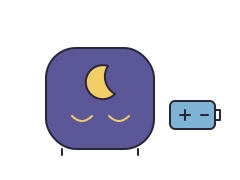
- Bedtimeeyes closed
- Wake-up timeeyes open
As an Amazon Associate I earn from qualifying purchases.
The tradeoff: No colored light: the eyes are the signal, its screen lights for only 30 seconds, you press the button every night, and ZAZU’s own shop has sold out.
From ZAZU’s own pages and manual: the sources.
Set this clock up
- Put 3 AAA alkaline batteries in the back (not zinc-carbon). Set the clock hands with the turning button, and the alarm volume from OFF to LOUD with the other.
- Press MODE to set the digital time: hours and minutes with UP and DOWN, confirming with MODE.
- Hold MODE for 3 seconds to set the OK-to-wake time the same way.
- Every night at bedtime, hold the big button on top for 3 seconds: Bobby closes his eyes and opens them at the OK-to-wake time. With the volume at OFF, the morning is silent.
ZAZU says Bobby is not a toy and that only an adult should change the batteries; switch it off when it is not in use.
Check the age warning and whether your child is ready separately, and see how to set an OK-to-wake clock for other clocks.
Setup and everyday controls
You set it with the buttons on the clock. No app is needed, and no account.
- How you set it
- Set on the clock
- Buttons on the clock
- Yes
- Change it from your phone
- No
- Account needed
- No
When grandma, a sitter or the other parent sets it
Anyone can use the buttons on the clock; there is no app to share. Whoever does bedtime has to hold the top button for 3 seconds so Bobby closes his eyes.
Schedules, light and sound
You switch the mode on at the clock.
What you can schedule on this clock
- Bedtime light at a set timeNo
- Wake-up signal at a set timeYes
- Nap timerNo
- Different weekend timesNo
 Wake-up signal at a set time
- Yes
 Bedtime light at a set time
- No
 Nap timer
- No
 Weekday and weekend times
- No
- Several light or sound changes a night
- No
- Start it by hand
- Yes
- Silent wake-up
- Yes
 Alarm sound
- Yes
- Sound machine
- No
- Shows the time
- Yes
Features the maker’s manual doesn’t mention aren’t listed here, so the clock matcher won’t suggest this clock for them.
A nap timer and a nap wake-up time work differently. The planner keeps them separate.
Clocks changing, or an early riser? Move the wake-up time in small steps with the clock-change planner.
Without Wi-Fi or a phone
It has no app and needs no Wi-Fi: you set and change everything on the clock, and switch its night mode on each evening.
Power, and what happens in a power cut
Batteries only, no plug
- Runs on battery?
- Runs on battery
- Power connection
- 3 AAA batteries (not included)
See why a battery that keeps the settings is different from one that keeps the light on.
Subscription and included parts
No subscription: everything works on the clock.
In the box
- Bobby sleep trainer
When your child outgrows the light
ZAZU Bobby the Bear can play a sound at its wake-up time, which you switch on or off. It has no alarm with a time of its own, so on school mornings the sound comes at the wake-up time itself. When to move on to a kids’ alarm clock.
Check it in your home
While you can still return it, try the buttons you will actually use. These are checks for you to make; we have not tested this clock.
- Find how to change the times and switch the wake-up light on, then check it shows the light and sound you chose.
- Check the brightness, the volume and where the clock stands, using the maker’s placement advice. Check what the lock stops and which buttons still work.
- Use the clock’s own preview or test, if it has one, rather than unplugging it or resetting it to see what happens.
- Show the other parent, a grandparent or the sitter the buttons. Read what to do after a power cut before you need it.
Agree on what the light means and what to do if it does not come on, then keep the manual or the maker’s help page with your plan.
Show your child what this clock’s light means, and leave a note for the sitter.
If the light does not come on, check the time, the mode and the power before you reset the clock.
Questions about ZAZU Bobby the Bear
Does ZAZU Bobby the Bear need an app?
No. You set it with the buttons on the clock, and no account or Wi-Fi is needed. App or buttons? →
What does my child see on ZAZU Bobby the Bear?
Bedtime: eyes closed. Wake-up time: eyes open. See the drawing →
What happens to ZAZU Bobby the Bear in a power cut?
Keeps running on its battery. Bobby runs only on 3 AAA batteries (not included), so a power cut changes nothing. Battery or memory backup? →
Can ZAZU Bobby the Bear do naps?
No. Its manual describes no nap timer and no separate nap wake-up time. Nap timers vs nap wake-up times →
Can I set a different time for weekends?
No. It has one wake-up time for every day, so change it on Friday night if you want a later weekend. Plan a new wake-up time →
Does ZAZU Bobby the Bear have an alarm?
It can play a sound at the wake-up time, which you switch on or off. It has no alarm with a time of its own. Kids alarm clocks →
Can grandma or a sitter change it?
Yes, with the buttons on the clock; nobody needs an app or an account. Sharing a clock →
The maker’s pages
Details can differ between versions and countries. Dates show when we last checked something that changes, like stock or a recall. Every source we use
- ZAZU: Bobby the bear · checked on 13 October 2026
- ZAZU: Bobby V2 manual (2022)